

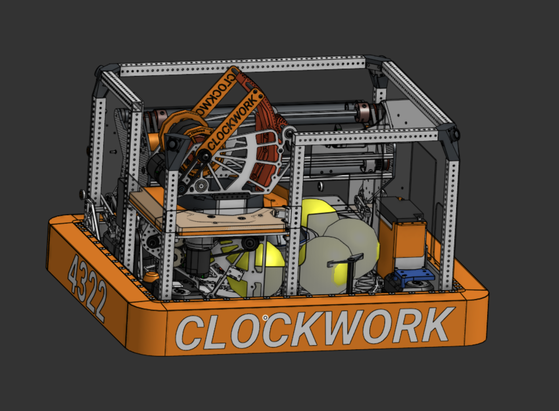
Centrifuge | 2026
Centrifuge | 2026

Centrifuge | 2026

2026 REBUILT

Finalist
2026 Galileo Division
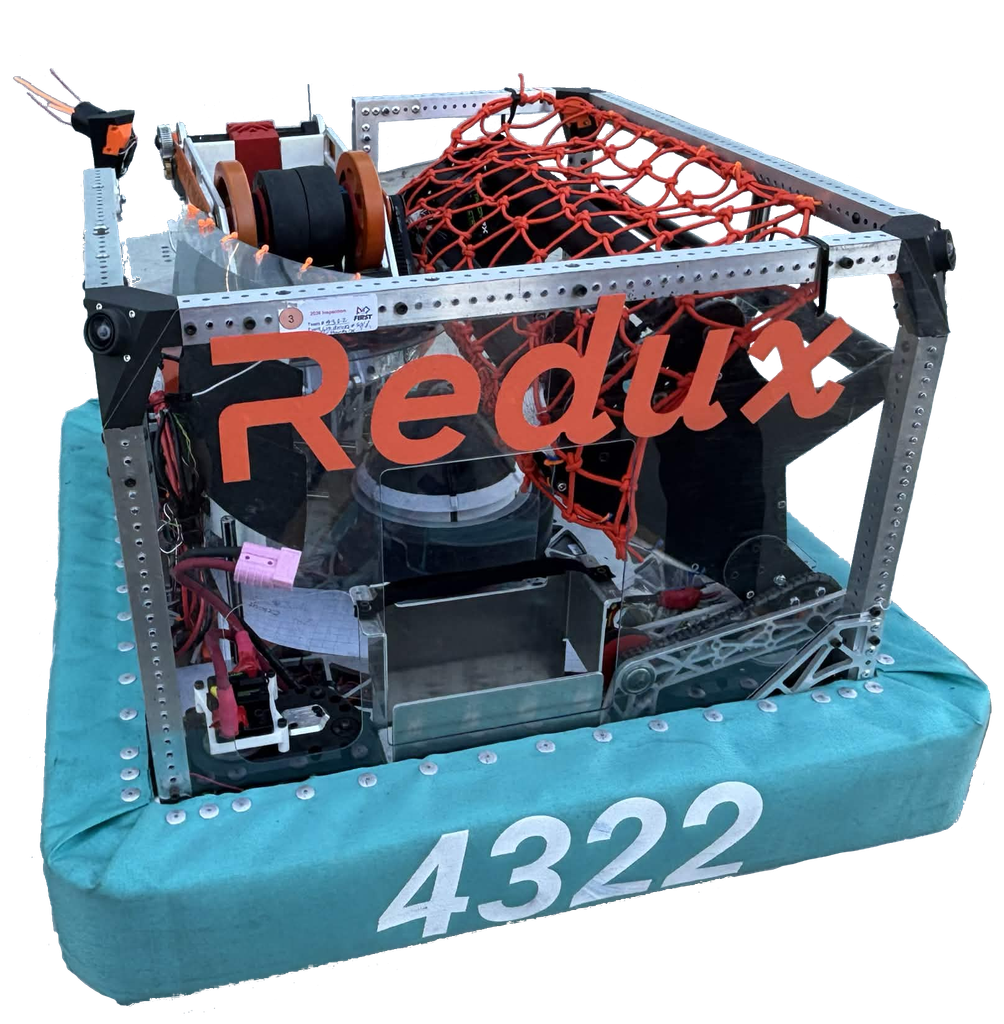
Robot Specifications
  • Status: Active
  • Weight: 109 lbs
  • Size: 29.5” W x 25.5” L x 22” H
  • 4-wheel SDS Mk5n swerve drive
  • Fuel ground intake
  • 720° turret
  • 10 in colson wheel spindexer
Events
  • CA District Los Angeles – El Segundo, CA
  • CA District Orange County – Mission Viejo, CA
  • FIRST California Southern State Championship – Anaheim, CA
Los Angeles District Event Matches

Match #AllianceResultVideo
Qualification 3RedWin✅
Qualification 10BlueWin✅
Qualification 15BlueLoss✅
Qualification 22RedWin✅
Qualification 29BlueTie✅
Qualification 36BlueWin✅
Qualification 43BlueWin✅
Qualification 55RedWin✅
Qualification 63BlueWin✅
Qualification 69RedWin✅
Qualification 76RedLoss✅
Semifinals Match 2RedLoss✅
Semifinals Match 5BlueWin✅
Semifinals Match 10BlueLoss✅
Data from The Blue Alliance

Orange County District Event Matches

Match #AllianceResultVideo
Qualification 4RedLoss✅
Qualification 8BlueWin✅
Qualification 16RedWin✅
Qualification 24BlueLoss✅
Qualification 30BlueWin✅
Qualification 35RedWin✅
Qualification 40RedWin✅
Qualification 45RedLoss✅
Qualification 51BlueWin✅
Qualification 60BlueWin✅
Qualification 64RedWin✅
Qualification 69BlueLoss✅
Semifinals Match 3RedWin✅
Semifinals Match 8RedWin✅
Semifinals Match 11BlueLoss✅
Semifinals Match 13RedWin✅
Finals Match 1BlueLoss✅
Finals Match 2BlueLoss✅
Data from The Blue Alliance

Championship Galileo Division Matches

Match #AllianceResultVideo
Qualification 13BlueLoss✅
Qualification 25RedWin✅
Qualification 35RedLoss✅
Qualification 49RedLoss✅
Qualification 63RedLoss✅
Qualification 73BlueWin✅
Qualification 88BlueWin✅
Qualification 98BlueLoss✅
Qualification 108BlueLoss✅
Qualification 122BlueWin✅
Semifinals Match 3BlueWin✅
Semifinals Match 8RedWin✅
Semifinals Match 11BlueLoss✅
Semifinals Match 13RedWin✅
Finals Match 1BlueLoss✅
Finals Match 2BlueLoss✅
Data from The Blue Alliance

In REBUILT™ presented by Haas, two competing alliances are invited to score fuel, cross obstacles, and climb the tower before time runs out. Alliances earn additional rewards for meeting specific scoring thresholds.

During the first 20 seconds of the match, robots are autonomous. Without guidance from their drivers, robots score fuel into their hub. Fuel can be pre-loaded into a robot, obtained from the human player, collected at the depot, or picked up throughout the center of the field. Some robots may also climb the tower to obtain additional points.

During the remaining 2 minutes and 20 seconds, drivers control their robots. Based on the result of autonomous play, alliance hubs will alternate between active and inactive, shifting gameplay between both sides of the field. Robots can collect fuel at any point in the match and may control any amount of fuel at a time. Drivers control their robots to score fuel into their hub while it is active and may perform defensive strategies or collect more fuel while their hub is inactive.

As time runs out, all hubs become active, allowing all robots to score. Robots can climb to the tower’s highest heights to score additional points and claim match bonuses to increase their position in the rankings.

The alliance that earns the most points wins the match!
Open Alliance Build Thread 2026

  • by JohnFogarty
    Ah.. yes…the trench I broke Read full topic
  • by guineawheek
    Initial thoughts on Systemcore performance Despite us wiring 13 Krakens into bus 0 and 5 more devices into bus 1 and absolutely none of this running at CAN-FD speeds we didn’t really see issues stemming from bus contention or from the alpha units having only 2 SPI buses used for CAN. I think many of our performance issues software-wise stemmed from how marginal our CPU budget often was on the roboRIO compared to the Systemcore platform. Then again, our drivetrain template only configures the relevant drivetrain signals to 100 Hz in a Canivore-less config, so perhaps we should try what […]
  • by KareemJaffer
    When people ask why I name my variables “a” and don’t document my code: In reality though, I watched a single youtube video on how to write descriptive code without comments and all my variables are now named excessively long (and I have a pet peeve of people naming objects as my[name of object]. At the very least get rid of the my! It means absolutely nothing, but is costing so many extra electrons! That weight of those electrons add up and next thing you know you’re taking off your brass flywheel to be competition legal since your code weighed […]
  • by dkavner
    guineawheek: RobotController.getTime() Our students would never have fallen into this trap of changing the behavior of a fundamental method and silently causing endless breakage and grief because we teach them to specify their units. Seriously, if you’re going to go to the effort to put “Time” in a method name, it’s infinitely better to use those 4 precious characters for “usec” or “nsec” instead. After all, they are still in the time domain and they are clear what unit of time they reference. Even with the astronomical cost of memory these days, I’d still accept students being even more verbose […]
  • by guineawheek
    A Systemcore-powered Robot first fully functional systemcore teleop After a couple weeks of meetings and concerted effort, we have finally gotten our robot match-ready[1] with a Systemcore (alpha) unit installed. This was an adventure in and of itself. Rewiring for More Buses We rewired much of the robot to take advantage of the five buses the Systemcore has, as well as give newer students hands-on experience wiring a robot after we had just taught them all to crimp Molex-SL. The general distribution of buses was as follows: Bus S0 – drivetrain affixed motors Drivetrain Kraken x60s/x44s Intake pivot Spindexer/tunnel motors […]
  • by dkavner
    Thanks. It’s gone in our 2027 code. Read full topic
  • by JohnFogarty
    I want to point out you have a function in the Clock Util class that is performing the exact same thing as a base WPILIB Timer function does. Probably best to retire that as this is the core reason this happened without you realizing it. Read full topic
  • by dkavner
    Just to be clear, our global pose is working perfectly now with the above fix to PhoenixOdometryThread. Read full topic
  • by dkavner
    Does your Systemcore robot know what time it is? We couldn’t get our global pose estimator to update from our vision inputs today, which was a huge panic because it was our final opportunity to run autos on a full field with perfect AprilTags before Tidal Tumble. We had simulated our autos, but given that we’re running Systemcore with a hacked version of PathPlanner, we really wanted to see it run IRL. We had a bunch of PhotonVision issues over the last 2 days that I’ll leave for @guineawheek to put his trademark humerus spin on. The bottom line is […]
  • by dkavner
    Thank you! We were in quite the panic to get the bot running and we just downloaded the latest Hardware Manager not realizing there might be a special one for Systemcore. We should have guessed as pretty much everything we’re running to make Systemcore work is some type of dev build without instructions. The good news is that we got our bot fully running today, including executing a flawless auto with PathPlanner. A hacked version of PathPlanner of course, but we didn’t have to change much in our code. Read full topic
  • by Brandon_Hjelstrom
    Did you use the hardware manager linked in the Systemcore repo? The newer hardware manager handles all of this and flashes in around 3 minutes. The older hardware manager will fail exactly as you described, but that version is several months old Here are the links to the latest software so you can make sure everything else is up to date: github.com GitHub – wpilibsuite/SystemcoreTesting: Repository for Alpha and Beta testing of… Repository for Alpha and Beta testing of Systemcore and Motioncore devices Read full topic
  • by dkavner
    Systemcore Update Woes Our Systemcore was at build 4. It has to be at build 12 to do an over-the-air upgrade. So, we followed the instructions to do a full re-image over USB with the Limelight Hardware Manager. The image is 2.3GB unzipped and was on track to complete in 20 minutes. It bombed at 500MB and couldn’t be restarted because the Limelight Hardware Manager could no longer find the device. Next, we tried to image with dd straight to the rdisk. This was all done from a Mac. dd would have taken 90 minutes, but we didn’t get that […]
  • by guineawheek
    JamesO1086: Are zinc’s enough for an OPI 6+? It says it takes 20V on the documentation. dkavner: The ZINC PRO does USB-C PD 100W (20V/5A), although they aren’t yet available. To be more specific, typically USB-PD chargers that advertise 100W will support 20v@5a. The USB-C spec typically limits current at 5A and power/current over 100W requires a separate mode. USB-PD is a negotiated protocol, so the Orange Pi will not fry itself as long as the power supply gives the voltage the OPi specifically asked for. It’s like active PoE in that sense, and if you plug in an unsupported […]
  • by dkavner
    The ZINC PRO does USB-C PD 100W (20V/5A), although they aren’t yet available. We’re the Redux alpha test team. Read full topic
  • by JamesO1086
    Are zinc’s enough for an OPI 6+? It says it takes 20V on the documentation. Also, how’d you guys protect it from being fried, damaged, etc/ is there a case y’all used/designed/purchased? Thanks! Read full topic
  • by dkavner
    We were prepared to run it in comp since it was our only spare, but we didn’t need to. We can take a picture of it this weekend. Our primary supply was the only functioning ZINC PRO in the world, hence our desire for a backup. Read full topic
  • by JamesO1086
    how much surgery? is this what y’all used in comp or is there smth else? We’re looking at upgrading our coproc but aren’t sure what to power on, so if you have pictures of what y’all did that’d be great, but no worries if not. Thanks! Read full topic
  • by dkavner
    We’re rewiring all of our CAN devices using Molex SL connectors with thick-plated gold, high insertion force crimp terminals as recommended for robotics applications with high vibration. Molex part numbers 16-02-1115 ($0.20) and 16-02-0117 ($0.24). We’ve used Molex SL for many years with much better results than our previous methods, although we didn’t pay much attention to the type of crimp terminals we were purchasing and using from COTS devices. We ended up with a mix of tin and thin-plated gold crimps, which we now know is strongly not recommended. We also had inconsistencies in training students and inspecting connections, […]
  • by dkavner
    @JamesO1086 Here is the part we adapted and tested at champs as a backup power supply. We didn’t use a socket to save space. We just did a little surgery instead. Read full topic
  • by TorstenTortise
    guineawheek: One of our students’ parents happened to have an 80W CO2 laser that they had no other use for. We’re not 100% sure what the make and model of laser it is, but we’re pretty sure it’ll cut wood, acrylic, and SRPP. A students parent had contact with a warehouse that needed to get rid of it and a few others for unknown reasons, pressumptivaly just to make space. Read full topic